5 Best Minimalist PC Case for Clean Desk Setups
The Lian Li V100 ATX Mid-Tower PC Case is the best minimalist pc case for most buyers. Its main advantage is a clean, understated shell with enough room for a standard ATX build, making it a practical choice for a tidy gaming or work setup.
This guide is for shoppers who want a restrained case without giving up upgrade space or useful cooling options. The key factors are overall size, motherboard and graphics card clearance, airflow, and front-panel connectivity. Material quality also matters because a plain exterior leaves little room to hide flimsy panels or poor fit. The 5 picks below are ranked with clear reasons and honest drawbacks for each, so you can compare compact layouts, larger ATX designs, and the features that affect daily use.
Quick Comparison
| # | Product | Best For | Price | |
|---|---|---|---|---|
| 1 | Lian Li V100 ATX Mid-Tower PC Case | Clean Midrange ATX Builds | ~$75 | View → |
| 2 | CORSAIR 4000D RS ARGB Mid-Tower ATX PC Case | ARGB-Focused Gaming Builds | ~$100 | View → |
| 3 | DARKROCK EC2 ATX Mid Tower PC Case | Budget ATX Builders | ~$55 | View → |
| 4 | Cooler Master Elite 502 Lite ATX PC Case | Simple Full-Size Office PCs | ~$83 | View → |
| 5 | Cooler Master Elite 301 Lite Micro-ATX PC Case | Compact Micro-ATX Workstations | ~$70 | View → |
5 Minimalist PC Cases Worth Buying
These PC cases are ranked by design, features, and value, counting down to the top minimalist pick.
5. Cooler Master Elite 301 Lite Micro-ATX PC Case

Best for: Compact gaming PCs with large GPUs
The Cooler Master Elite 301 Lite is a compact Micro-ATX case for buyers who want a cleaner desk setup without giving up full-size gaming hardware. It also supports Mini-ITX boards, GPUs up to 365mm long, CPU coolers up to 163.5mm tall, and power supplies up to 160mm. Around $70, it targets budget-conscious builders who still want tempered glass and front USB Type-C.
Its strongest feature is the open front intake grille, which gives six supported fans a clear path for fresh air. The chassis also supports a 280mm liquid cooler, giving builders more cooling options than many small cases. One 120mm fan comes included, so extra fans will likely be needed for a powerful graphics card or high-wattage processor. The large GPU allowance should fit many current cards, including models such as the RTX 5080 and RX 9070 XT, but check the card’s exact length and power cable clearance first.
Pros
- Supports graphics cards up to 365mm long.
- Fits 280mm liquid CPU coolers.
- Includes front USB Type-C and tempered glass.
Cons
- Limited to Micro-ATX and Mini-ITX motherboards.
- Only one 120mm fan is included, so added fans increase the total build cost.
4. Cooler Master Elite 502 Lite ATX PC Case
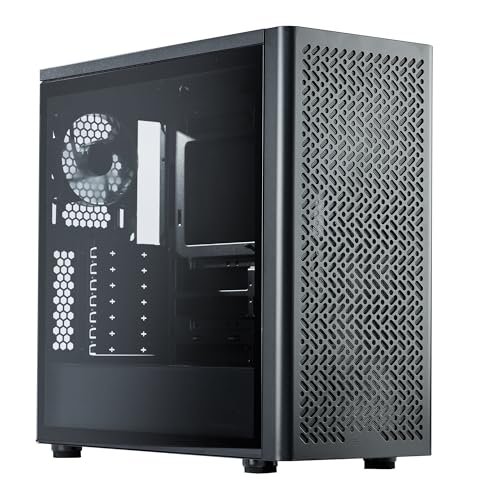
Best for: Minimalist ATX gaming builds
The Cooler Master Elite 502 Lite is an ATX and Micro-ATX PC case with a simple front design, a large intake grille, and a tempered-glass side panel. Its roomy interior supports graphics cards up to 410mm long, including the listed RTX 5090 and RX 9070 XT. It also accepts CPU coolers up to 170mm tall and power supplies up to 170mm long.
The main advantage is its upgrade room for a midrange price, around $83. It supports up to seven fans and includes one 120mm fan, while the front intake design gives added airflow potential. The case can also fit a 360mm liquid-cooling radiator, which suits powerful processors. A front USB Type-C port adds useful connectivity for newer devices. Still, the minimalist layout favors flexibility over a fully equipped package, so buyers should budget for extra cooling hardware.
Pros
- 410mm GPU clearance fits many large modern graphics cards.
- Supports seven fans and a 360mm AIO radiator.
- Tempered glass and a simple exterior suit clean PC builds.
Cons
- Only one 120mm fan is included, so extra fans may be needed.
- Large components can make installation and cable routing more demanding.
3. DARKROCK EC2 ATX Mid Tower PC Case

Best for: Budget ATX gaming builds
This DARKROCK EC2 is an ATX mid-tower case for gaming PCs and general desktop builds. It supports ATX, Micro-ATX, and Mini-ITX motherboards, giving builders several platform options. The front panel uses mesh to improve air intake, while tempered glass side panels let you display the finished system. It also accepts graphics cards up to 340 mm long and power supplies up to 200 mm long.
Cooling support is strong for a case around $55. You can install up to eight 120 mm fans, plus a 360 mm radiator at the front. Separate magnetic filters sit on the top and bottom, making routine dust removal easier than with fixed screens. The Type-C-ready design also gives newer accessories a place to connect, though buyers should confirm the included front-panel ports and cable setup before purchasing. The main trade-off is size. Large components may fit, but clearance becomes tighter near the front radiator and cable area.
Pros
- Mesh front panel supports better airflow for gaming components.
- Fits up to eight 120 mm fans and one front-mounted 360 mm radiator.
- Supports ATX, Micro-ATX, Mini-ITX, and graphics cards up to 340 mm.
Cons
- Fan and radiator support does not mean those cooling parts are included.
- A front 360 mm radiator can reduce available space for long graphics cards and front cable routing.
2. CORSAIR 4000D RS ARGB Mid-Tower ATX PC Case

Best for: Airflow-focused ATX gaming builds
The CORSAIR 4000D RS ARGB is a black mid-tower case for ATX systems. At around $100, it targets builders who want strong cooling without moving to a larger chassis. Its front panel uses perforated steel with a Y-pattern design, giving intake air a relatively open path. Three RS ARGB PWM fans come pre-installed at the front. Each fan has eight LEDs, supports a 4-pin PWM connection, and works with a motherboard’s 5V ARGB header. Zero RPM support can stop the fans during light workloads, if the motherboard allows it.
The standout feature is the flexible internal layout. Its steel InfiniRail system lets you slide front fans into different positions. It supports fans up to 200mm at the front and 140mm on the roof. The side section beside the motherboard tray can hide cables or accept extra fans when removed. The FRAME system also allows future changes to parts such as the motherboard tray and front I/O panel. ASUS BTF, MSI Zero, and Gigabyte Stealth layouts are supported.
Pros
- Three included front fans provide immediate airflow and ARGB lighting.
- Sliding rails support flexible fan placement and larger front fans.
- Removable side section offers a choice between cable coverage and extra cooling.
Cons
- Lighting control requires a compatible 5V ARGB motherboard header.
- Only three fans are included, all mounted at the front.
1. Lian Li V100 ATX Mid-Tower PC Case

Best for: RGB-focused gaming PC builders
The Lian Li V100-ATX is a black mid-tower case for mainstream gaming and workstation builds. It supports ATX, Micro-ATX, and Mini-ITX motherboards, along with compatible back-connect ATX and Micro-ATX boards. Four pre-installed 120mm PWM ARGB fans provide a strong starting point for airflow. They reach up to 1,800 RPM, with rated airflow near 60 CFM and noise from 26.5 to 30.8 dBA. At around $75, it offers useful hardware support without requiring a separate fan kit.
The case fits graphics cards up to 420mm, CPU coolers up to 178mm, and a top-mounted radiator up to 360mm. A built-in 26-LED ARGB strip adds another lighting zone and can sync with motherboard software. The fans support daisy-chain connections, which can reduce cable clutter. Tool-less side panels also make component access faster. Hydraulic fan bearings should help keep operation smooth, though maximum-speed fan noise may still be noticeable.
Pros
- Includes four 120mm PWM ARGB fans, reducing extra setup costs.
- Supports long 420mm GPUs and 360mm top radiators.
- Tool-less side panels provide quick access during upgrades.
Cons
- Fan noise can reach 30.8 dBA at higher speeds.
- Back-connect motherboard support depends on board compatibility.
Buying Guide
The most important factor is component compatibility, because a clean exterior does not help if the graphics card or cooler cannot fit. Check the case’s internal limits before choosing a compact enclosure, especially when using full-size gaming hardware.
- Motherboard support: Confirm the case accepts your board size, such as Mini-ITX, Micro-ATX, or ATX. A Micro-ATX build needs at least 9.6 by 9.6 inches of tray space.
- Graphics card clearance: Look for at least 10-15 mm more length than your GPU requires. Many modern cards measure 12-14 inches, while thick three-slot models may need 3.5 inches of width.
- CPU cooler and radiator room: Compare the listed CPU cooler height with your tower cooler. Leave 5 mm of extra space. For liquid cooling, verify support for a 240 mm radiator if that is your planned setup.
- Airflow and dust control: Choose room for two 120 mm front or bottom intake fans and one 120 mm rear exhaust. Removable mesh filters reduce dust buildup.
- Build cost and usability: A sensible price band is $70-$150. Favor tool-free panels, at least two included fans, and front USB-C if your motherboard supports its header.
If compromises are necessary, prioritize component clearance and airflow over the smallest footprint or simplest exterior.
Frequently Asked Questions
What makes a minimalist PC case a good choice?
A minimalist PC case is a good choice if you want a clean desk setup, simple airflow paths, and fewer visual distractions. Look for a restrained exterior, hidden cables, and enough room for your parts. Many compact models measure about 30 to 45 liters, so check graphics card length and CPU cooler height first.
How do I choose a minimalist computer case for my parts?
Choose a minimalist computer case by matching its motherboard, graphics card, cooler, power supply, and fan support to your components. For example, an ATX board needs a case labeled ATX, while a 330 mm graphics card may require extra front clearance. Check radiator sizes too, since 240 mm and 360 mm mounts need different space.
Can minimalist PC cases stay cool with powerful components?
Yes, minimalist PC cases can cool powerful components, but only when they provide open intake areas and enough fan or radiator mounts. A practical layout may use two 140 mm front fans, one 120 mm rear fan, and a CPU cooler rated for the processor. Solid front panels can restrict airflow, so inspect ventilation before buying.
Are small minimalist PC cases hard to build in?
Small minimalist PC cases are usually harder to build in because they leave less room for cable routing and component access. A 15-liter enclosure can require shorter power supplies, low-profile coolers, or compact graphics cards. Cases above 25 liters often offer easier assembly while keeping a plain exterior and smaller footprint than a standard tower.
Conclusion
Lian Li V100 ATX Mid-Tower PC Case is the strongest choice for builders who want a clean, understated enclosure with room for a standard ATX setup and future upgrades. If your priority is a smaller footprint, pick a compact Micro-ATX or Mini-ITX case instead, since it takes up less desk space but limits expansion. Before buying, double-check the case’s dimensions, motherboard and graphics-card compatibility, cooler and power-supply clearances, included fan quantity, and current price. Confirm that your planned parts fit together, not just that each component fits on paper. A simple parts list can prevent costly returns and surprises during assembly, especially with large coolers, long graphics cards, or several storage drives.